
You are using an out of date browser. It may not display this or other websites correctly.
You should upgrade or use an alternative browser.
You should upgrade or use an alternative browser.

Here's a new one: Dash backlights come on-and-off as though I am putting the headlights on
- Thread starter MikekiM
- Start date

The right park/turn lamps ground at the right side of the radiator closure panel and the left park/turn lamps ground at the left radiator closure panel. Cluster illumination is connected to parking lamps as you probably know.
The cluster illumination and both turn signal indicators both ground at G201 which is in the area behind the cluster possibly accessible by removing the speaker trim as noted by @dbbd1

The cluster illumination and both turn signal indicators both ground at G201 which is in the area behind the cluster possibly accessible by removing the speaker trim as noted by @dbbd1
Last edited:
Almost comical.. Out of nowhere..
Since the left turn signal and brake command both caused problems, I’d check ground to the rear left tail light since it may be shared.
I would also pull the cluster and clean/dissolve any corroded pins you see with D5 Deoxit. Doing so fixed a 99 that cut in and out right after I purchased it…it had piano key looking pins that were corroded from the Jeep previously living in Hawaii and NY. Not sure if your 2000 has the same pin style.
Last edited:
This is tremendous.. thank you. Would have taken me a week of Sundays to find this in the manual. G200/201.. that's behind and below the drivers side speaker.The right park/turn lamps ground at the right side of the radiator closure panel and the left park/turn lamps ground at the left radiator closure panel. Cluster illumination is connected to parking lamps as you probably know.
The cluster illumination and both turn signal indicators both ground at G201 which is in the area behind the cluster possibly accessible by removing the speaker trim as noted by @dbbd1
View attachment 605457
I did have an issue with one of the connectors for the BMB brake lights.. the driver side. I'll check that.Since the left turn signal and brake command both caused problems, I’d check ground to the rear left tail light since it may be shared.
I would also pull the cluster and clean/dissolve any corroded pins you see with D5 Deoxit. Doing so fixed a 99 that cut in and out right after I purchased it…it had piano key looking pins that were corroded from the Jeep previously living in Hawaii and NY. Not sure if your 2000 has the same pin style.
And I also had an issue with the cluster a while back, though not as rogue as this one, and pulling the cluster, cleaning the contacts and reinstalling all connectors with a little di-electric gel solved it. So did smacking the top of the cluster.. just sayin'.
So did smacking the top of the cluster.. just sayin'.
Smacking the cluster helped with that one too lol.
I fixed many things over two months of ownership just so I could sell it with a clear conscience. :/
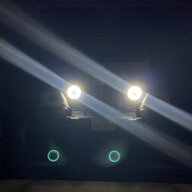
The right park/turn lamps ground at the right side of the radiator closure panel and the left park/turn lamps ground at the left radiator closure panel. Cluster illumination is connected to parking lamps as you probably know.
The cluster illumination and both turn signal indicators both ground at G201 which is in the area behind the cluster possibly accessible by removing the speaker trim as noted by @dbbd1
View attachment 605457
This guy...
Time to pull my speaker out AGAIN to check that ground since I get the same issue as the original poster randomly throughout the week (funnily enough, its after going over the speed bump in the work parking lot, which I only do when I'm running late as hell)
This guy...
Time to pull my speaker out AGAIN to check that ground since I get the same issue as the original poster randomly throughout the week (funnily enough, its after going over the speed bump in the work parking lot, which I only do when I'm running late as hell)
I am interested in what you find...
I checked the drivers side tail light, as someone suggested.. it's all good.
Haven't checked the other grounds yet. It's been raining non-stop. I've just been driving with the running lights...
I am interested in what you find...
I checked the drivers side tail light, as someone suggested.. it's all good.
Haven't checked the other grounds yet. It's been raining non-stop. I've just been driving with the running lights...
It will be a bit, my ole TJ is going in for a bunch of work on the front end (Basically replacing ball joints, control arms, drag/tie rods, and track bar) and resealing my transmission again since my LL is getting mad about the nickel sized tranny fluid stains that disappear after rain....
Anywho, Ill try to take a look when I get home before I swing it by the shop and see if the ground is just kaput.
So far checked the grounds at the drivers tail light and drivers dash behind the speaker grill. Only things I can get to between rain drops. Today I will eyeball the grounds by the headlights and will pull the cluster, clean & lube.
Here's a really silly question.. aren't third brake lights always off other than when the brake is applied regardless of whether running lights are on? Can't lie.. I never checked whether mine were on or not. When I turn on the running lights the little lug nut LEDs I have in place of and wired into the factory tail gate contacts come on steady. They are dual brightness and match what the tail lights do. Should they be off even when the head, tail and running lights are turned on?
Here's a really silly question.. aren't third brake lights always off other than when the brake is applied regardless of whether running lights are on? Can't lie.. I never checked whether mine were on or not. When I turn on the running lights the little lug nut LEDs I have in place of and wired into the factory tail gate contacts come on steady. They are dual brightness and match what the tail lights do. Should they be off even when the head, tail and running lights are turned on?
Open your tailgate and see if it solves the problem...
-Mac
Yep.. rain should let up today. Going to disconnect the third brake lights.
What a mess..
KennethS
TJ Addict
No progress on this...
Checked grounds at the G200/201 location behind the speaker grill, the tail lights, both headlights all good. Pulled the cluster, cleaned and applied di-electric gel. No improvement.
Have to get under the dash to check the ground @KennethS mentioned. And might replace the turn signal assembly.
Checked grounds at the G200/201 location behind the speaker grill, the tail lights, both headlights all good. Pulled the cluster, cleaned and applied di-electric gel. No improvement.
Have to get under the dash to check the ground @KennethS mentioned. And might replace the turn signal assembly.
No progress on this...
Checked grounds at the G200/201 location behind the speaker grill, the tail lights, both headlights all good. Pulled the cluster, cleaned and applied di-electric gel. No improvement.
Have to get under the dash to check the ground @KennethS mentioned. And might replace the turn signal assembly.
I’m tellin’ ya - Exorcist. Doesn’t sound so crazy now, does it?

Electrical problems are so often difficult to track down. Good luck, Mike. Hang in there. There are enough electrical wizards here that hopefully with some help you can get it resolved quickly.
Needle in a haystack.I’m tellin’ ya - Exorcist. Doesn’t sound so crazy now, does it?
Electrical problems are so often difficult to track down. Good luck, Mike. Hang in there. There are enough electrical wizards here that hopefully with some help you can get it resolved quickly.
Good news, if there's any, is that I still have lights (though I do have aux lights up front) and once the lights are on, everything else seems to work as expected.
There's a shop not far from me that specializes in mystery electrical problems.
Mac, tell me more please.The rear harness ends up on the 100 pin block under the dash on the driver's side. Might want to unplug that entire harness and test and see if it occurs/doesn't occur. Then you'll at least be able to focus in on an area.
-Mac
Look under your dash... driver's side...giant connector block...in the resources section are the Factory Service Manual...look up your model year... section 8w... wiring diagrams.
-Mac
-Mac
Look under your dash... driver's side...giant connector block...in the resources section are the Factory Service Manual...look up your model year... section 8w... wiring diagrams.
-Mac
And that feeds power to the back of the jeep?
And that feeds power to the back of the jeep?
The entire rear harness for the tail lights connects there, runs down and under the driver's door, up and over the wheel arch, then down through the tub to the driver tail light, under the tub just above the rear fuel tank skid to the passenger tail light and third brake light connectors. That also catches any hard top wiring... defrost, wipers, and your sound bar and cab light.
-Mac
Similar threads
- Replies
- 4
- Views
- 1,247
- Replies
- 13
- Views
- 954

- Replies
- 11
- Views
- 468

- Replies
- 6
- Views
- 657
- Replies
- 8
- Views
- 1,391
